
CareOne · Electronic patient record (EPR) · In production
The patient record that adapts to your care teams, not the other way round.
CareOne is an electronic patient record fully rewritten by ALTRONIS. Interoperable, modular and secure by design, it is configured at the pace of your clinical departments, with no need to wait for the next release.
 (enlarge the image)
CareOne presentation video
 Play the video (1 min 29 s)
Read the English transcript of the video
Every day in hospital, women and men commit themselves to caring for others. In the corridors, on the wards and at the bedside, every minute counts. Everything is organised around welcoming and supporting patients. What if technology allowed them to focus fully on what matters most?
Discover CareOne, the patient record that adapts to healthcare professionals. Not the other way round. With its clear and intuitive interface, CareOne is designed to simplify the daily work of hospital teams and to adapt naturally to the needs of each department.
CareOne brings the patient’s information together in a structured record, accessible and secure, to make the work of healthcare professionals easier. From the emergency department to inpatient care, through nursing care and examinations, its features support every step of the patient pathway. Clinical pathways encourage coordination between teams, while the management and reporting tools give an overall view of hospital activity.
CareOne includes three intelligent assistants, designed to support hospital professionals in their daily work. SAM makes the software easier to use and provides personalised assistance. CAP supports the organisation and optimisation of care pathways. CLIO assists doctors in analysing patient records and writing their reports, always under their control.
CareOne, so that carers can devote themselves fully to the patient. The patient record that serves care. CareOne, a solution by ALTRONIS.
We started again from a blank page.
Many patient records are built on foundations designed decades ago. Every change becomes a project, every interface a one-off development, and it is often the care teams who adapt to the software. Rather than adding yet another layer, we rewrote CareOne entirely, to today’s standards and requirements.
| What we left behind | What we built |
|---|---|
| A monolithic block that is hard to change | Independent modules, deployed according to your priorities |
| Interfaces developed case by case | Native interoperability, based on standards |
| Fixed screens, identical for every department | Views and forms that each department configures |
| Security added as an afterthought | Security and traceability built in from the design stage |
| Dreaded updates | Regular, controlled releases |
Four principles, no compromise.
Interoperable
It speaks the language of your information system.
CareOne does not replace your information system, it becomes part of it. It exchanges data with your existing applications (patient administration, laboratory, imaging, pharmacy) using the reference standards of healthcare, in France and internationally.
- HL7 v2 for patient movements, orders and results
- FHIR R5 for modern API-based exchanges
- IHE PAM profile for patient identity and movement management
- CDA R2 following the sections of the French CI-SIS interoperability framework published by the ANS, the French Digital Health Agency
- DICOM for medical imaging
- French national health identifier (INS), qualified by calling the INSi teleservice
Modular
It grows department by department.
Start with what you need, then add modules when you are ready. Each module evolves independently: a new feature does not call the whole system into question, and an update does not bring the hospital to a standstill.
- Gradual roll-out, by department or by function
- 42 modules across seven areas, 40 of them in production
- A common core (identity, access rights, traceability) shared by all modules
Secure and compliant by design
Security and regulation from the first line of code.
Security is not an option added at the end of a project. Authentication, fine-grained access rights, traceability of every access and encryption of data exchanges are part of CareOne’s architecture. The product is designed to meet the requirements of the healthcare sector and to be deployed with an HDS-certified hosting provider (HDS is the French certification for hosting health data).
- Access rights by role, by department and by care context
- Logging and traceability of access to the record
- Adherence to the GDPR and to the PGSSI-S, the ANS’s general security policy for health information systems
- Data hosted by Scaleway, an HDS-certified hosting provider
Adaptive in real time
Your departments configure it, and the change applies as soon as it is approved.
A new instruction, a new protocol or a new form? Each department’s designated leads adapt their own views, forms and workflows in CareOne. Once approved, the change applies straight away, with no custom development and no waiting for the next release.
- Forms, views and workflows configurable by department
- Changes applied as soon as they are approved, and logged
A concrete example, in the emergency department
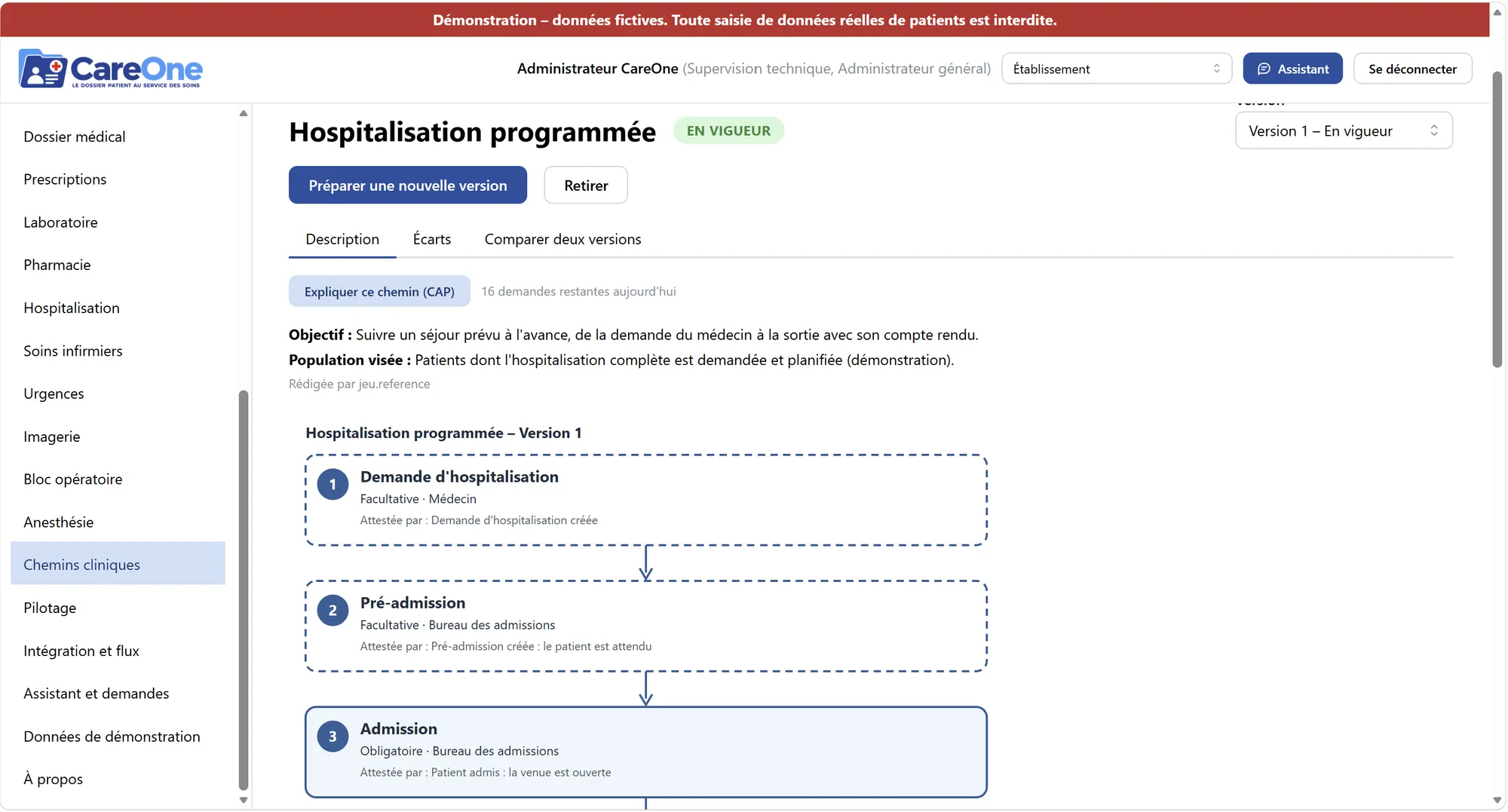
- The nurse manager opens Clinical pathways, then the supplied “Emergency visit” pathway (arrival, triage, care, decision, discharge or admission).
- A new junior doctor clicks “Explain this pathway” (CAP). They get a readable summary of the steps, the expected timeframes and who usually handles each one.
- In the Deviations tab, the nurse manager chooses a period and clicks “Summarise these deviations” (CAP). CAP might reply, for example: “triage happens late in one stay in three, especially at weekends”.
- The nurse manager then clicks “Propose a revision” (CAP). CAP drafts a proposal, for example to review the timeframe for that step. The pathway lead, a member of senior management, reviews this text. Only they approve and publish a new version, after obtaining the agreement of the department’s heads. That agreement is obtained outside the software.
CareOne on screen.
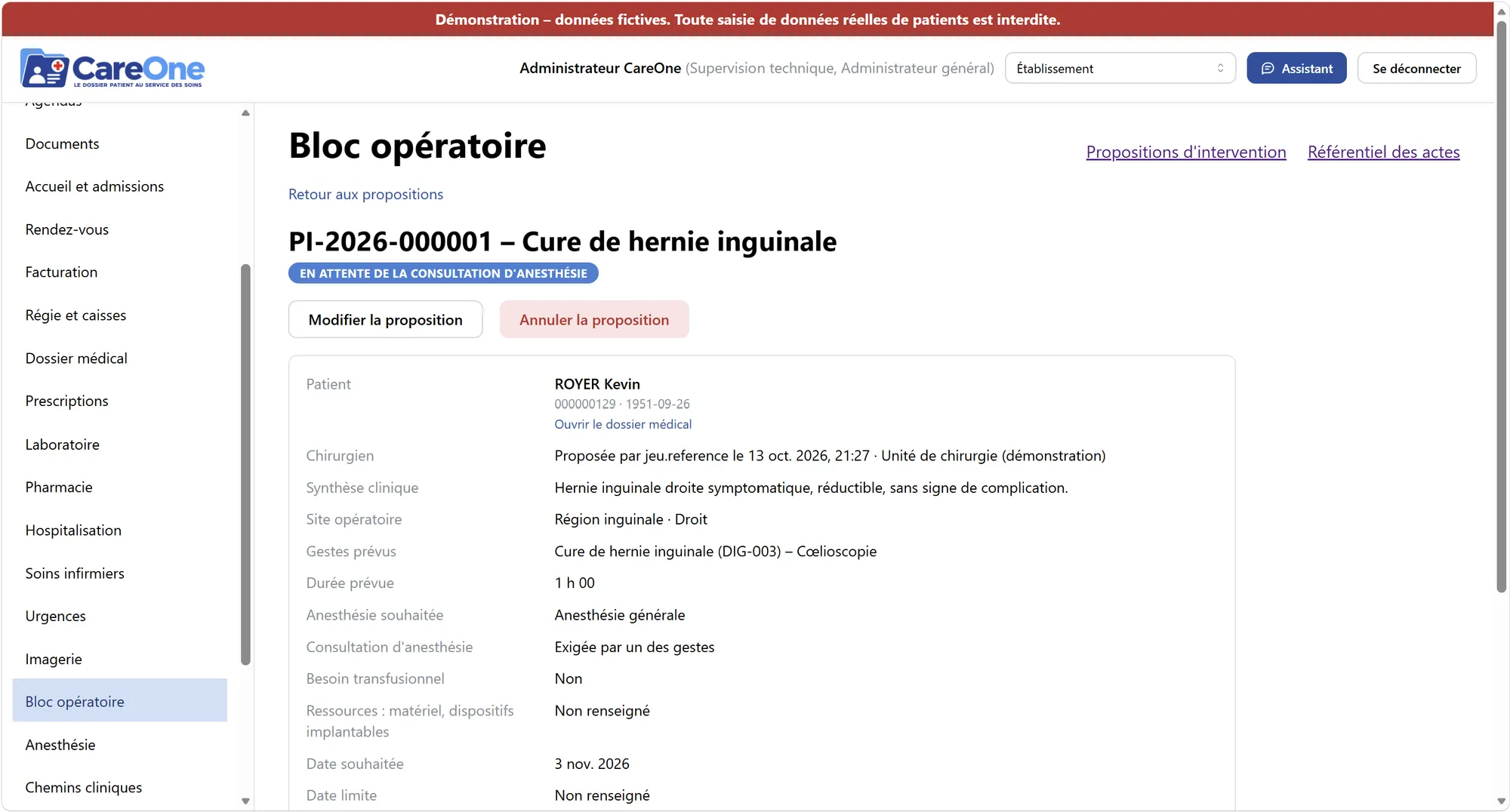
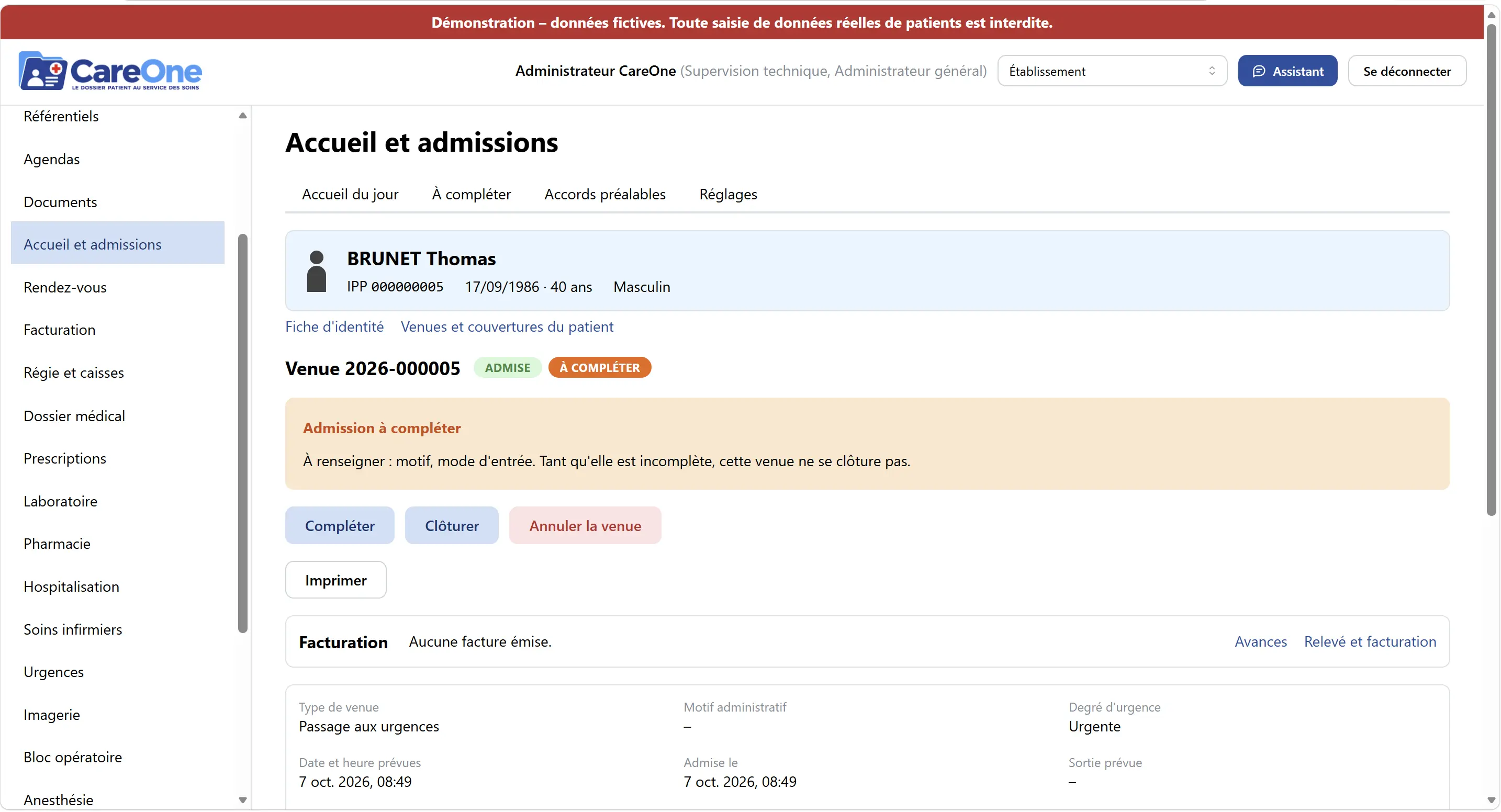
These screenshots come from the CareOne demonstration environment: all patient data in it is fictitious. The interface is shown in French. Click an image to enlarge it.
 (enlarge the image)
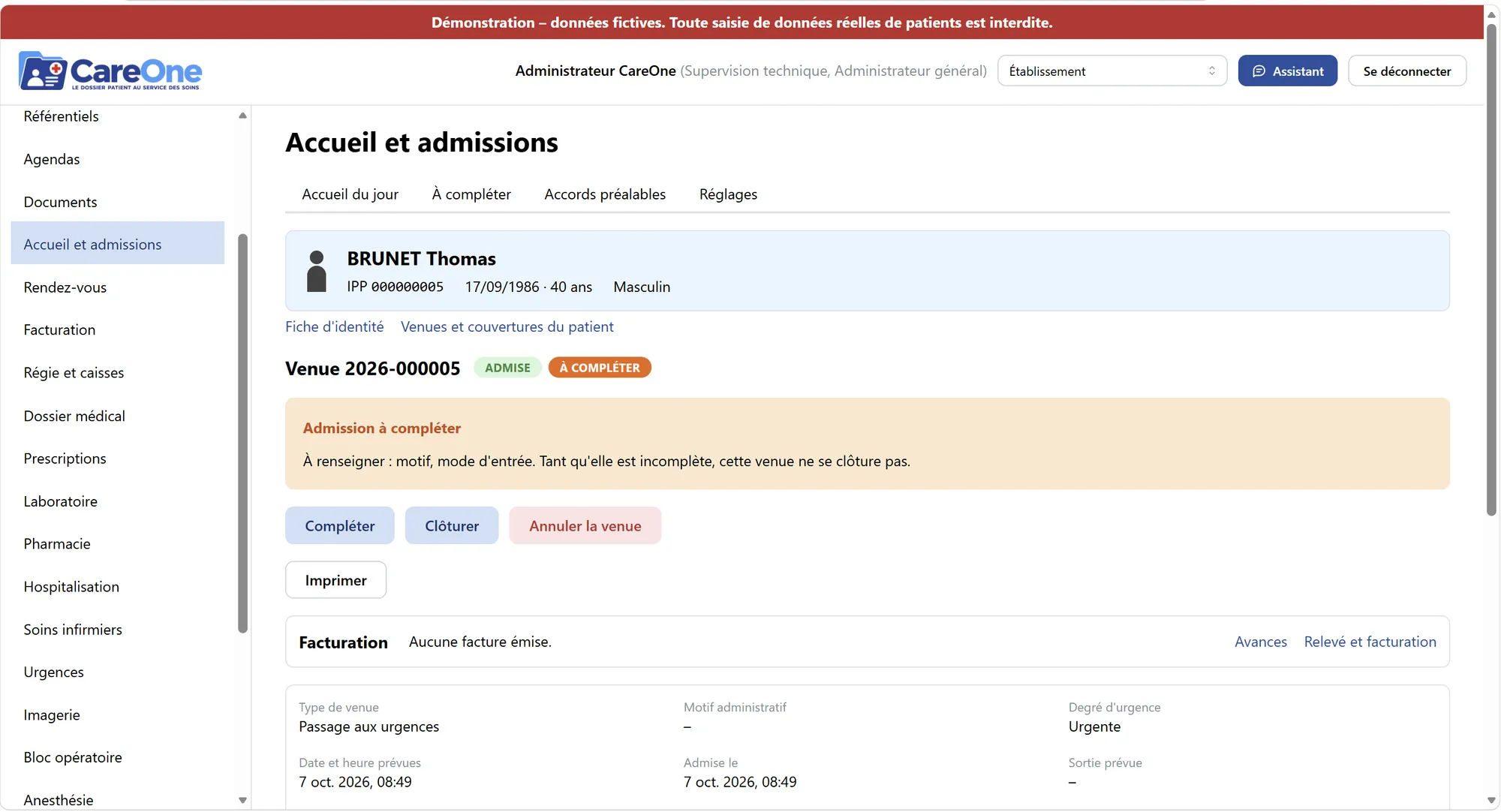
Reception and admissions: a patient’s visit, and what remains to be completed. 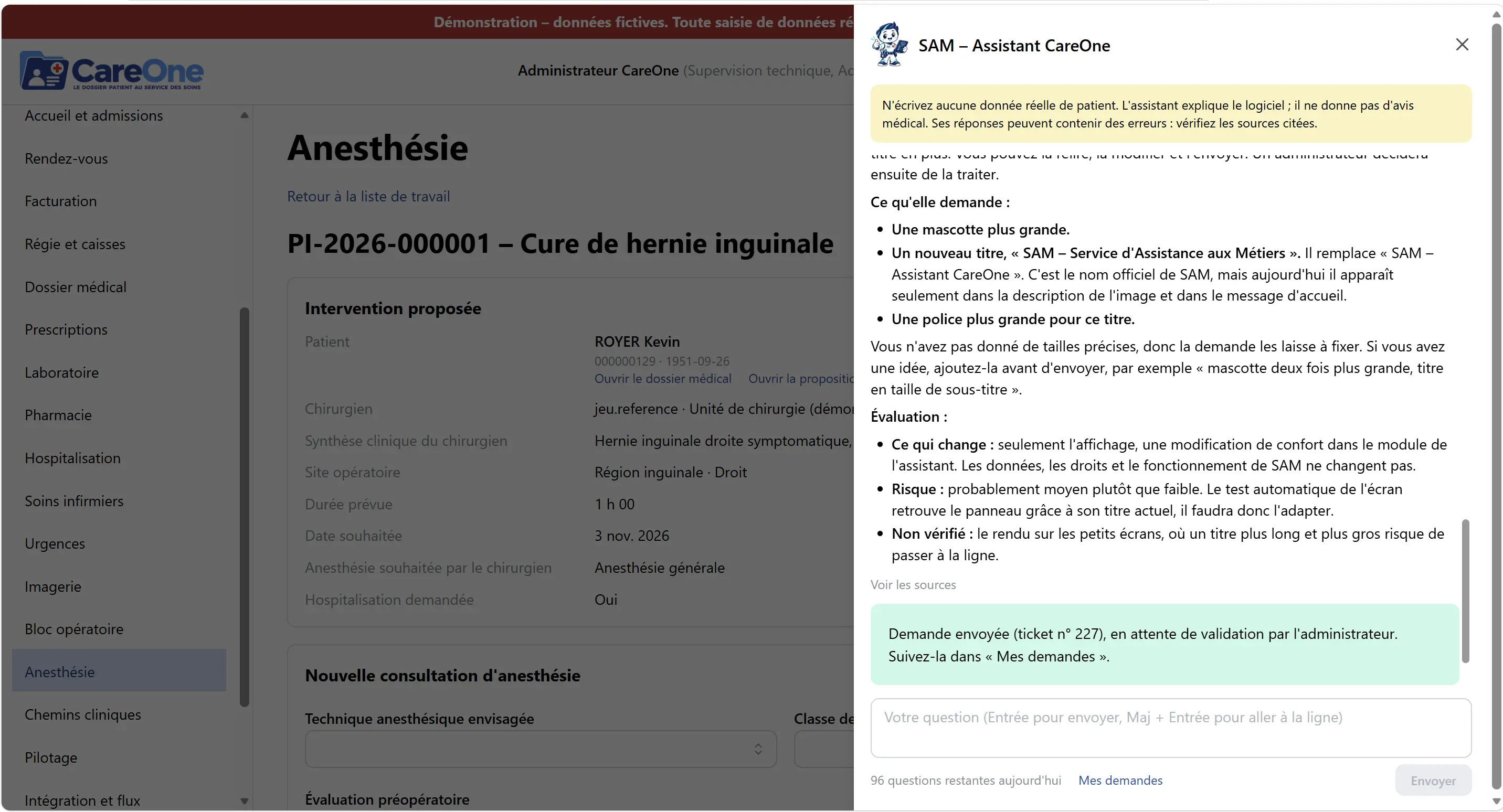 (enlarge the image)
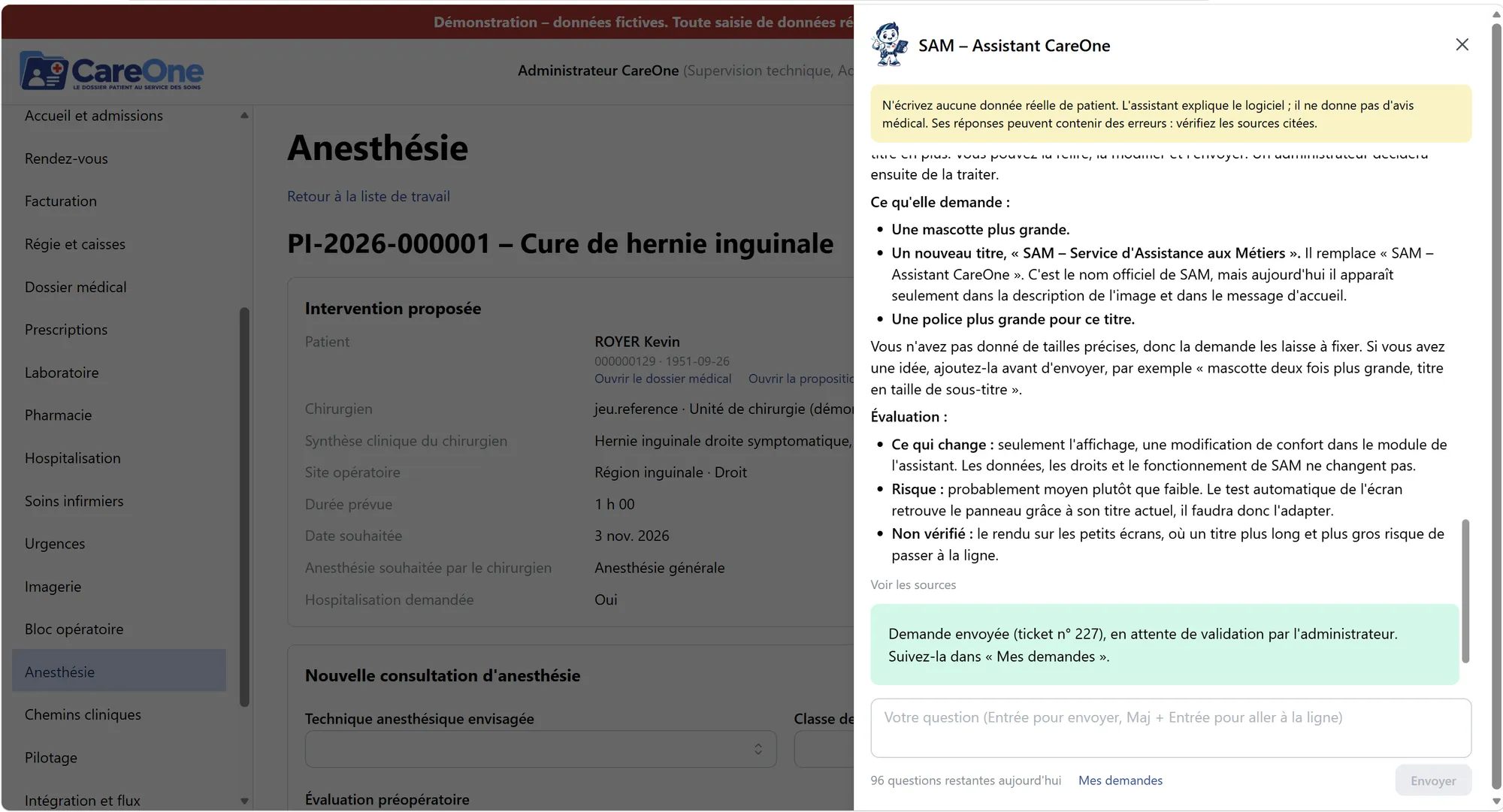
SAM drafts a change request, assesses it, then sends it for approval. 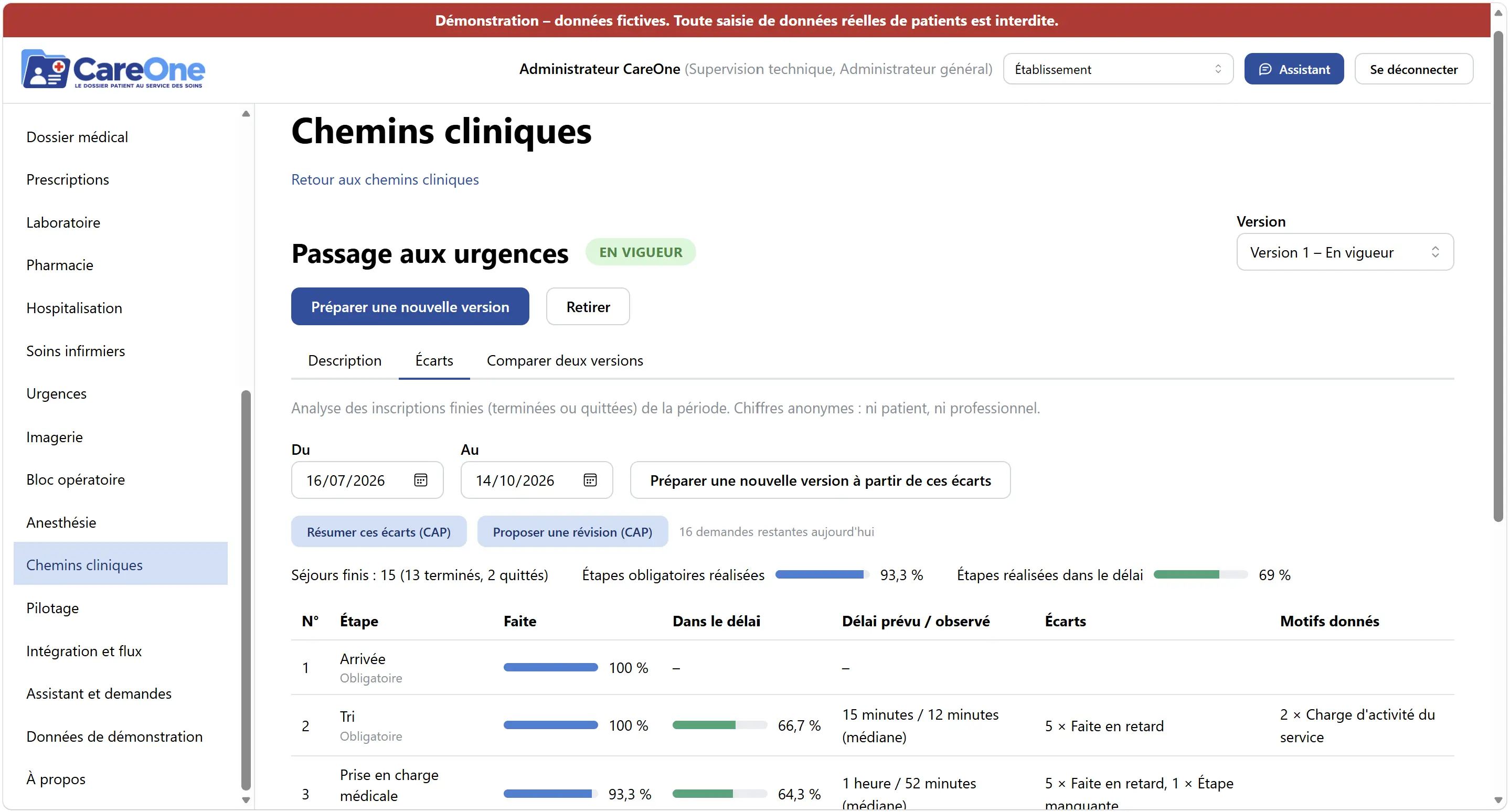 (enlarge the image)
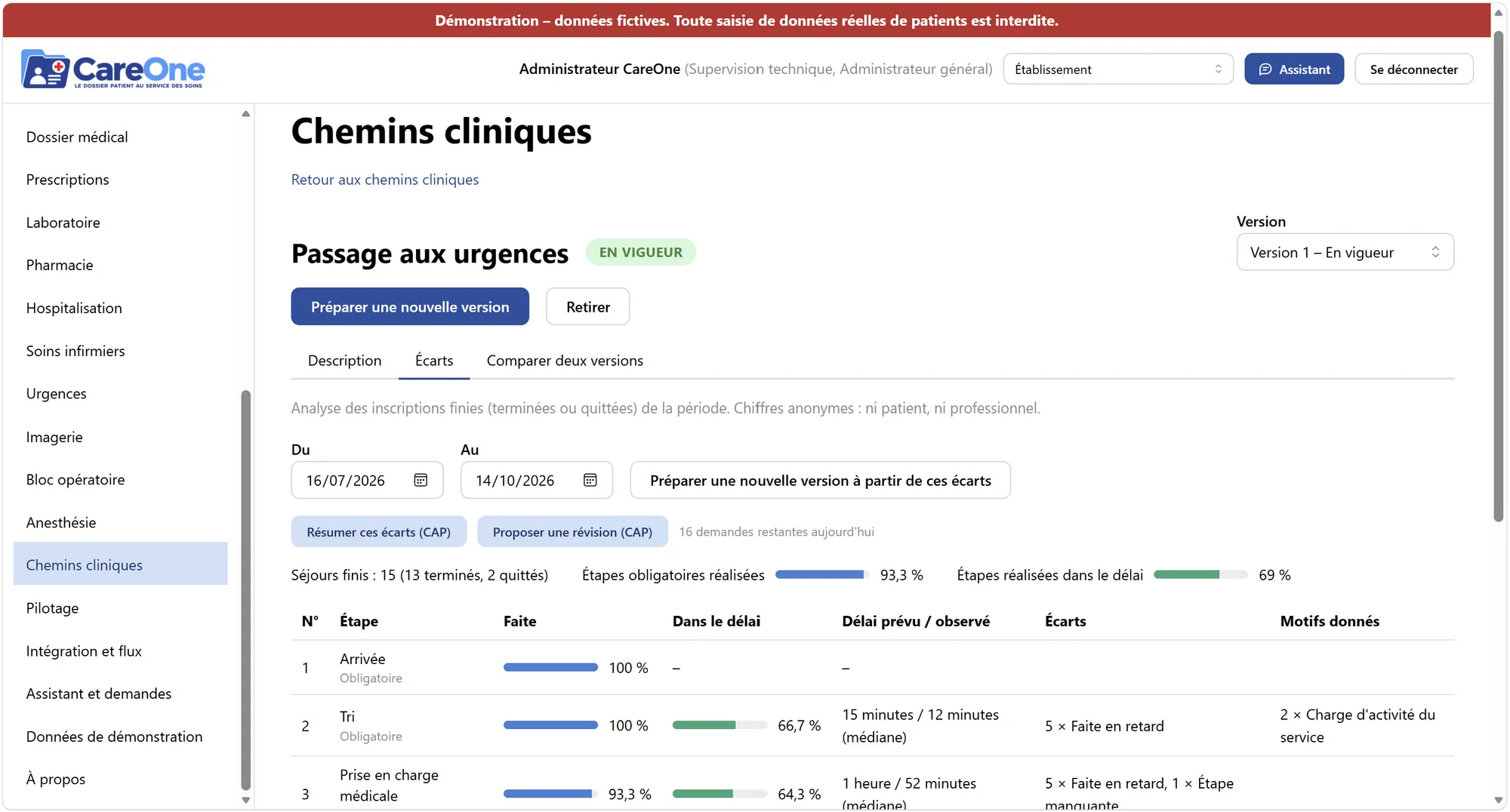
Clinical pathways: the gaps between the planned pathway and reality, in anonymous figures. 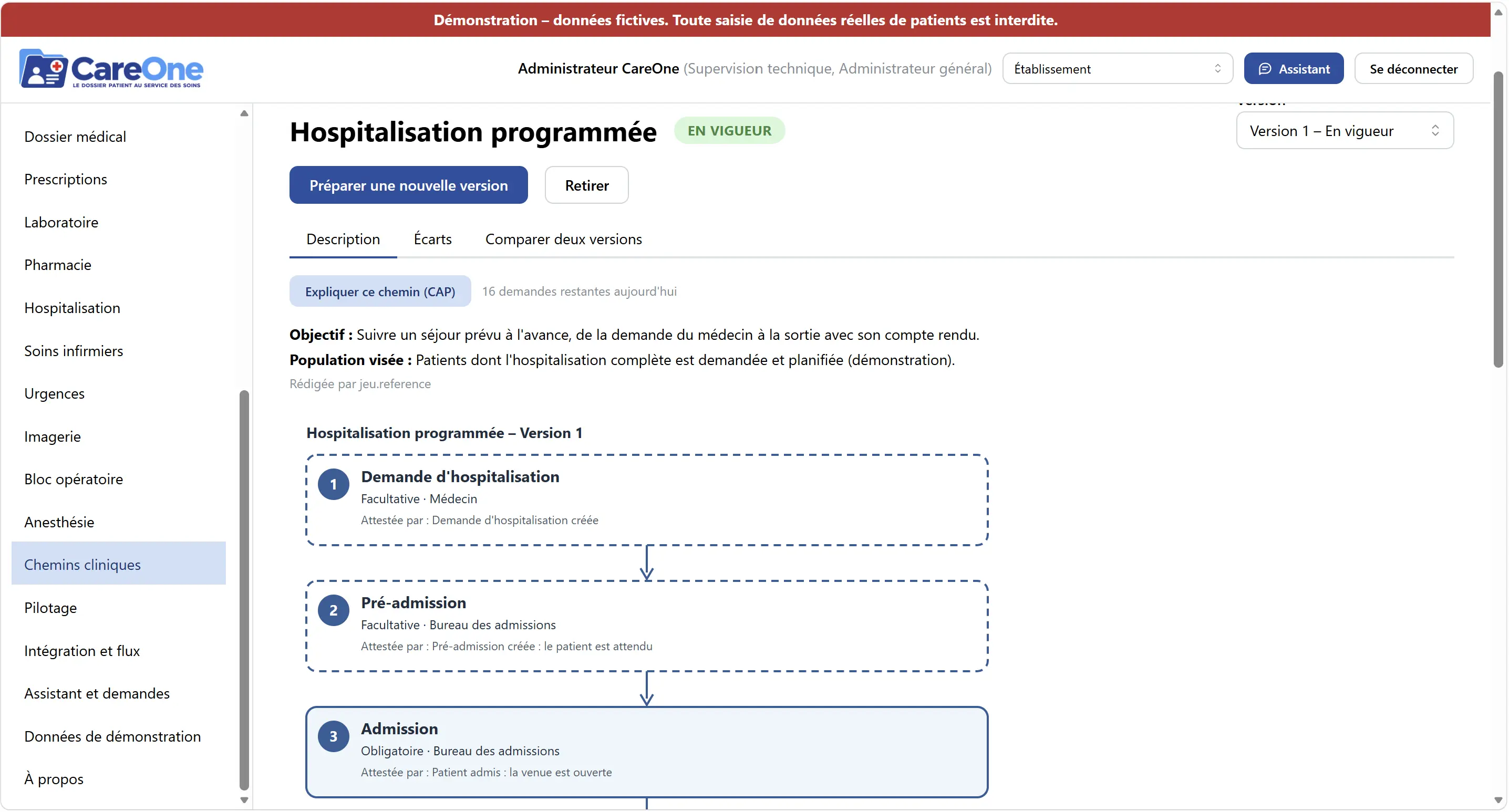 (enlarge the image)
A clinical pathway, described step by step. 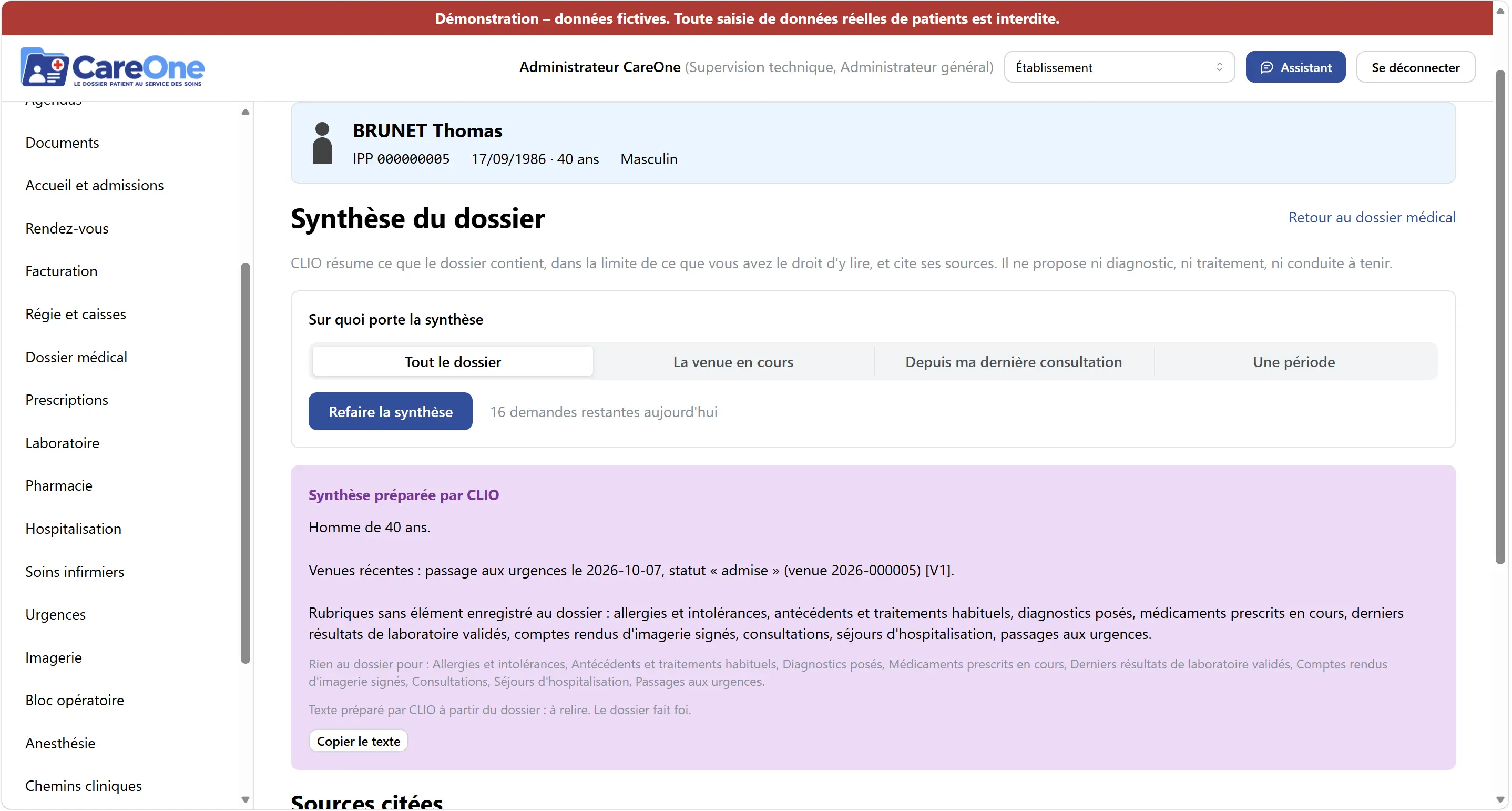 (enlarge the image)
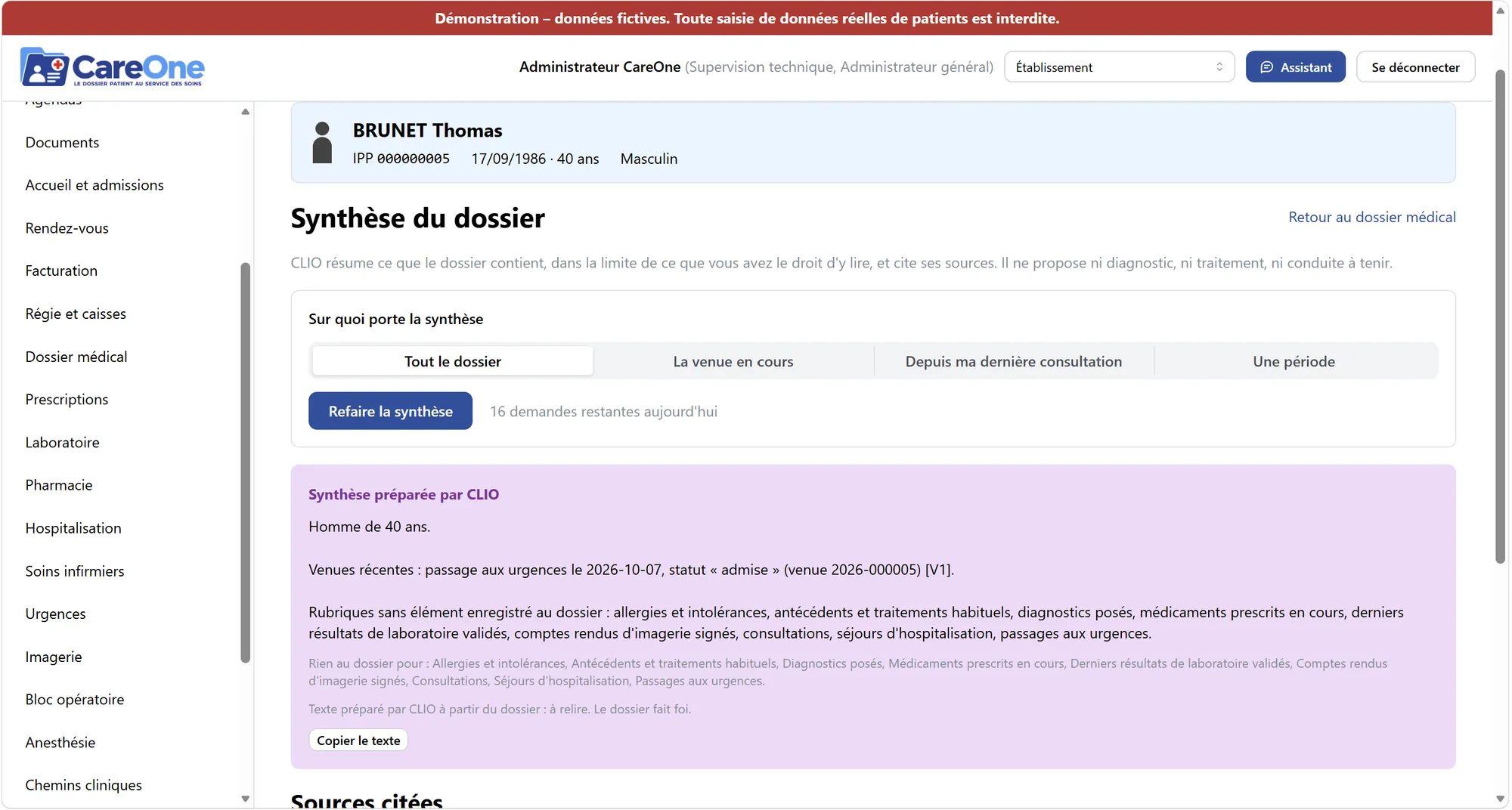
CLIO summarises a patient’s record and cites its sources. 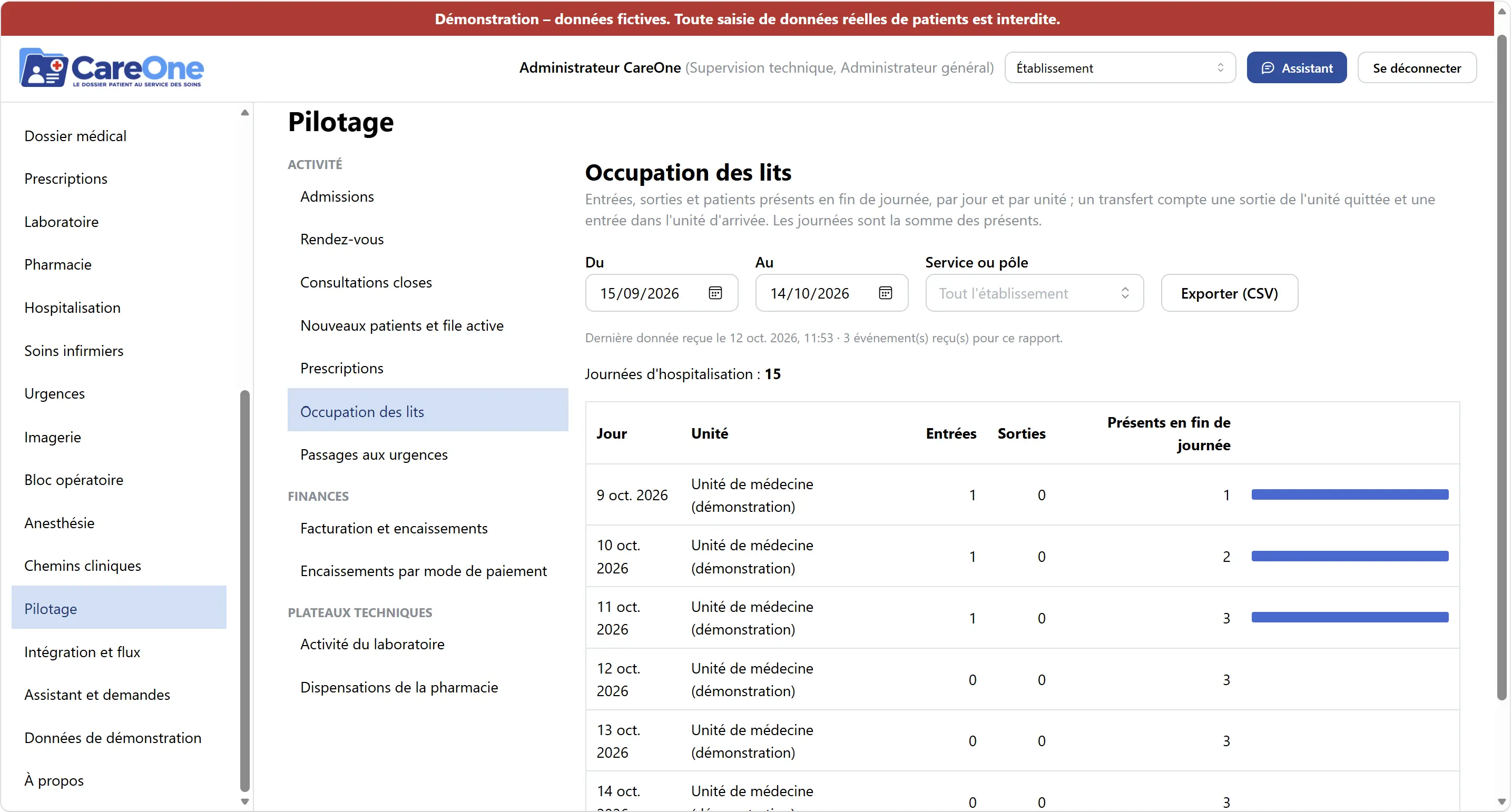 (enlarge the image)
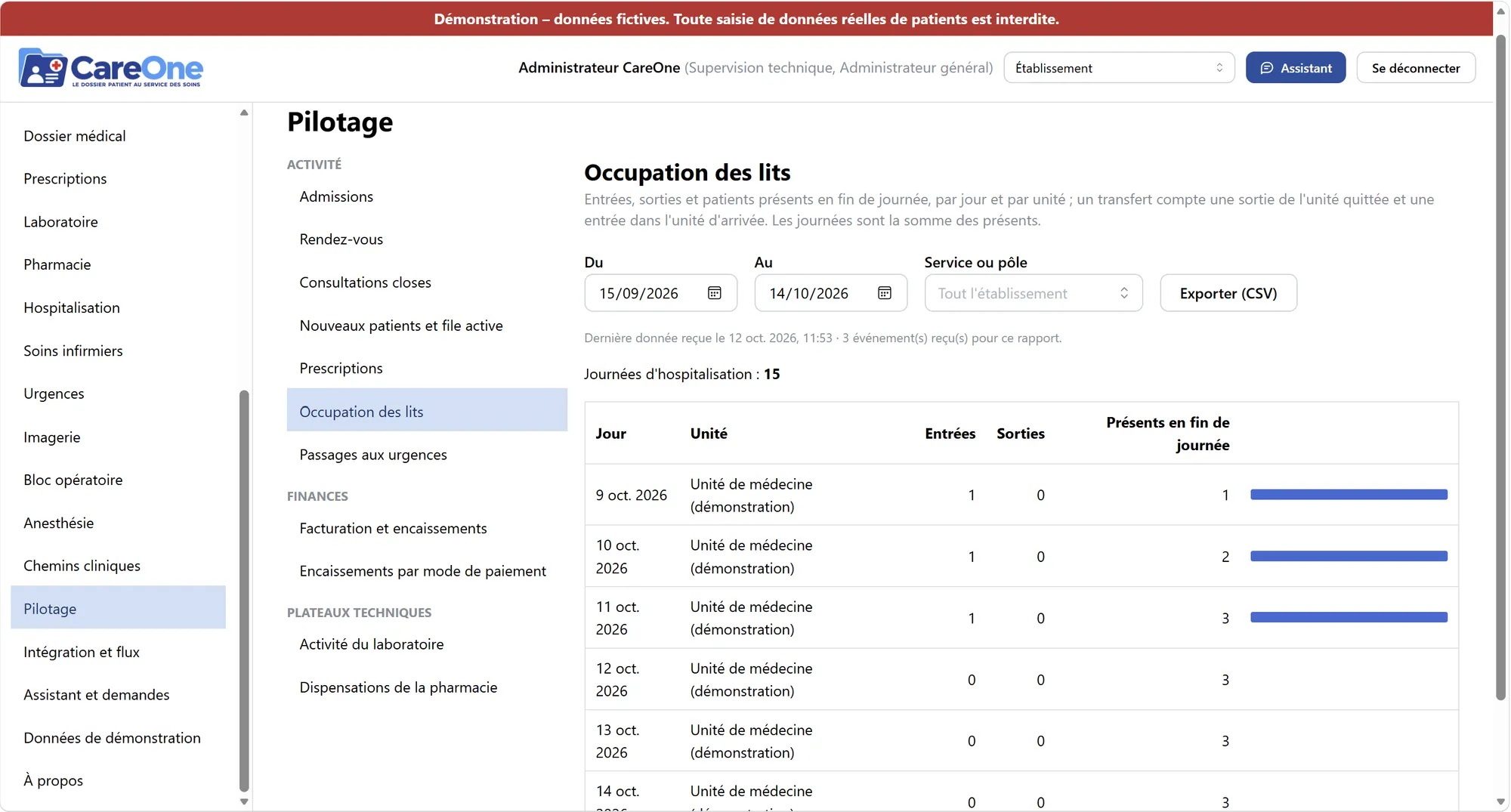
Steering: bed occupancy, per day and per unit.
Three assistants built on native AI
CareOne includes three assistants built on native artificial intelligence (AI). Each has a clearly defined role, audience and limits.
SAM
Service d’Assistance aux Métiers: CareOne’s assistant for care and administrative professions
SAM talks about the software.
A question about CareOne? A change you need? Ask SAM. Your software answers you: SAM explains CareOne and drafts your change requests and incident reports.
« Understand, request, report »
Help with the software only: SAM reads no patient data and gives no medical advice.
- For whom
- Any signed-in user, in care or administration
- Purpose
- Explain the software
- Draft change requests and incident reports
- What it reads
- The software’s documentation and code
- Patient data
- None
- What it never does
- Give medical advice or care recommendations
CAP
Conception et amélioration des parcours: designing and improving care pathways
CAP talks about the organisation.
Learning clinical pathways: your practice shapes your protocols. Describe the expected pathway. CareOne observes what actually happens, without monitoring anyone. Your teams decide what changes, with evidence to back it up.
« Describe, observe, revise »
Help with improving pathways only: your teams approve and publish every pathway.
- For whom
- The clinical pathway lead, managers, senior management
- Purpose
- Explain a clinical pathway
- Summarise deviations
- Prepare a revision
- Measure its effect
- What it reads
- Pathways and their deviations, aggregated and anonymous
- Patient data
- No identifiable data, about either patients or professionals
- What it never does
- Approve or publish a pathway
CLIO
Copilote clinique intelligent et opérationnel: an operational clinical copilot
CLIO talks about one patient.
The record read for you, the report ready to review. Ask for a summary of a patient, or for the draft of a letter. CLIO only reads what you are entitled to read, cites what it has read, and never signs in your place.
« Summarise, draft, approve »
Writing assistance only: the doctor reviews and approves every draft.
- For whom
- Doctors
- Purpose
- Summarise a patient’s record, with a source for every item
- Help draft reports and letters (discharge, referral, letters to the patient’s GP)
- Rephrase a text written by the doctor
- What it reads
- The record of a single patient, within the limits of the doctor’s access rights
- Patient data
- Yes: the data the doctor is entitled to read. Every access is logged.
- What it never does
- Suggest a diagnosis, a treatment, an examination or a course of action
- Write to the record without the doctor’s approval
42 modules, seven areas.
Forty modules are in production. Radiotherapy and nuclear medicine are planned.
Common core
- Patient identity and identity vigilance
- Organisational structures, users and access rights
- Terminologies and reference data
- Forms, rules and templates
- Schedules and resources
- Documents and archiving
- Integration and data flow monitoring
Administrative and financial pathway
- Reception and admissions
- Appointments
- Billing and pricing
- Cash desks and payment collection
- Debt recovery and third-party payers
- Practitioners’ fees
Patient record and care
- Medical record
- Prescribing
- Nursing record
- Inpatient stays and bed management
- Emergency department
- Public health programmes
- Mobile and offline use
Diagnostic and technical services
- Laboratory
- Anatomical pathology and cytology
- Medical imaging: orders, worklist, picture archiving and communication system (PACS)
- Other services: functional testing, rehabilitation
- Operating theatre
- Anaesthesia, recovery room and intensive care
- Blood transfusion
Specialities
- Oncology and chemotherapy
- Radiotherapy (planned)
- Nuclear medicine (planned)
- Haemodialysis
- Obstetrics and delivery room
Pharmacy and logistics
- Pharmacy and medication management
- Purchasing and general stores
- Internal patient transport (portering)
- Linen management
- Patient catering
- Equipment maintenance: work requests, connector to a computerised maintenance management system (CMMS)
Management and reporting
- Business intelligence and reporting
- Clinical coding
- Accounting interface
- Safety vigilance and adverse events
One patient record, a benefit for everyone.
| For… | CareOne gives you |
|---|---|
| Care and medical teams | Screens designed for their practice, configured by their department, and the right information at the right time. |
| The IT department | Integration through standards and APIs, independent modules, updates without disruption. |
| Senior management | Gradual roll-out, controlled investment and a solution that keeps pace with the organisation. |
| The chief information security officer (CISO) and the data protection officer (DPO) | Security and traceability that are built in, documented and verifiable. |
Designed to integrate, not to isolate.
CareOne sits at the heart of your health information system and talks to the applications that make it up.
CareOne within the organisation’s information system
Diagram description :CareOne, surrounded by an “APIs and interoperability” layer, exchanges data with six families of applications: patient administration (HL7 v2, IHE PAM), laboratory (HL7 v2), imaging (DICOM, HL7 v2), documents (CDA R2, CI-SIS), identity (INS via INSi) and other business applications (FHIR R5).
A concrete example: the imaging workflow.
From the order to image viewing and the report.
CareOne, the hospital’s picture archiving and communication system (PACS) and the imaging devices exchange data in six steps, all based on standards.
CareOne
EPR, always the system that orders the examination
- Ordering and scheduling the examination
- Patient identity management: local patient identifier (IPP) and French national health identifier (INS)
- Tracking the examination
- Report and access to images, through the PACS viewer
Hospital PACS
Image storage and worklist management
- DICOM image storage
- Worklist management (DICOM MWL)
- Image viewer
- Standard interfaces: HL7, DICOM, DICOMweb
Modalities
Imaging devices
- CT
- MRI
- X-ray
- Ultrasound
1. Examination orderHL7 ORM / OMI
from CareOne to Hospital PACS
- Patient identity (IPP, INS)
- Order: type of examination, clinical indication, priority
- Scheduling information
2. Identity updatesHL7 ADT, IHE PAM profile
from CareOne to Hospital PACS
- Creating or updating a patient
- Merging duplicates
- Correcting an identity (IPP, INS)
3. Worklist queryDICOM MWL C-FIND
from Modalities to Hospital PACS
- List of examinations scheduled for the modality
- Filters: date, application entity (AE) title
4. Worklist responseDICOM MWL C-FIND, response
from Hospital PACS to Modalities
- Scheduled examinations
- Accession number
- Patient and examination data
5. Examination imagesDICOM C-STORE
from Modalities to Hospital PACS
- Images of the examination
- DICOM metadata: accession number, patient, modality
6. Examination completed and images availableHL7 ORU or DICOMweb
from Hospital PACS to CareOne
- Availability notification (HL7 ORU), or query by CareOne (DICOMweb, using the accession number)
- Access to the images through the PACS viewer, from the accession number
With or without a radiology information system (RIS)
In both cases, CareOne remains the system that orders the examination.
The hospital has no RIS
CareOne takes on its role:
- justification of the examination;
- scheduling;
- tracking of the examination;
- report;
- contrast media.
The hospital has a RIS
The RIS handles the order, scheduling, the worklist, dictation, the report and the dose. CareOne interfaces with it:
- it receives statuses, reports and the procedures performed;
- it keeps billing.
Patient identity in DICOM objects
- PatientID: the IPP, the hospital’s local identifier
- INS: secondary identifier, to be configured according to current recommendations
Additional, optional exchanges
- Examination status: start and end (HL7 ORM / ORU)
- Report (HL7 ORU)
Simplified diagram
- The diagram shows a hospital with no RIS: CareOne takes on its role.
- Here, the PACS also acts as the worklist provider.
Another example: the laboratory workflow.
From the order to the report, CareOne runs the laboratory workflow.
In integrated mode, CareOne runs the workflow itself: receiving the tubes, entering the results, technical validation followed by validation by the laboratory physician, and the report. It connects to the analysers or to their middleware. This mode is in service.
CareOne
EPR and laboratory workflow
- Test ordering
- Care plan: specimen collection
- Receiving the tubes
- Entering the results
- Technical validation, then validation by the laboratory physician
- Report
- Results, history, trend charts
- Alerts on critical values
No middleware in CareOne
Laboratory equipment
Middleware
Drives the analysers, when the laboratory has one
- Dispatches the tests to the analysers
- Quality control
- Reruns, dilutions
On site, next to the analysers
Analysers
Biochemistry, haematology…
- Read the barcode
- Run the tests
- Send back the results
The workflow, step by step
1. Test ordering
In CareOne, by the prescriber
- The order feeds the care plan, which shows the specimen collection
2. Specimen collection
In the care unit
- Each tube is labelled with a barcode
3. Receiving the tubes
In CareOne, at the laboratory
- The laboratory records the arrival of each tube
4. Tests
CareOne and the analysers, or their middleware
- CareOne connects to the analysers or to their middleware
- The results are entered in CareOne
5. Validation
In CareOne, at the laboratory
- Technical validation
- Then validation by the laboratory physician
6. Report and results
In CareOne, in the patient record
- Report
- Results, history and trend charts
- Alerts on critical values
What about the tube?
The labelled tube follows its own path: specimen collection in the care unit, reception at the laboratory, run on the analyser. Its barcode carries the specimen identifier, which is distinct from the order number: one order often produces several tubes.
If the hospital keeps its laboratory system: connector mode
CareOne also provides for a connector mode: it orders the tests and receives the results, and the hospital’s laboratory information system (LIS) carries them out, whatever its vendor.
1. Test order
from CareOne to The hospital’s LIS
HL7 OML^O21, IHE LTW profile (transaction LAB-1)
- The laboratory answers with an ORL^O22 message
2. Patient identity, merging of duplicates
from CareOne to The hospital’s LIS
HL7 ADT, IHE PAM profile
- Local patient identifier (IPP) and French national health identifier (INS)
3. Results validated by the laboratory physician, and report
from The hospital’s LIS to CareOne
HL7 ORU^R01 (transaction LAB-3)
- Tests coded in LOINC, or in local codes with a mapping table
- UCUM units
- Report as a PDF, embedded in the ORU message or sent in an MDM^T02 message
Between the LIS, the middleware and the analysers, the exchanges (IHE LAW, ASTM) are internal to the laboratory: they stay outside CareOne.
In both modes
- CareOne orders the tests and presents the results in the patient record.
- No middleware in CareOne.
In connector mode, to be decided by each hospital
- Who prints the tube label: CareOne at the bedside, or the LIS?
- The format of the order number and of the specimen identifier, end to end.
Frequently asked questions
- Does CareOne replace my whole information system?
- No. CareOne is a patient record that integrates with your existing information system and exchanges data with your other applications.
- Can it be rolled out gradually?
- Yes. Its modular design lets you start with one department or one function, then extend.
- Where is the data hosted?
- With Scaleway, in France, a hosting provider certified for health data (HDS).
- Who can adapt the screens and forms?
- The designated leads in each department, according to the rights you give them. Every change is logged.
- What does a demonstration involve?
- The demonstration lasts about 20 minutes, by video call or in person: it shows how to get started with the tool. CareOne also includes a built-in training path (onboarding). We provide demonstration accounts so that your users can judge the software for themselves. The demonstration uses entirely fictitious data.